
Website design, redesign & management / Designed By Dane
A website should make your business easier to understand — and easier to choose.
I build websites around what your customers actually need to know: what you do, who you help, why they should trust you, and what they should do next.
Whether you're starting from scratch, replacing an outdated site, or improving something you already have, the goal is the same: build the amount of website your business actually needs.
They fail because the business is difficult to understand.
A visitor lands on the site and still isn't sure exactly what the business does.
Services, location, pricing context, trust information, or contact details take too much effort to find.
Without hierarchy, visitors don't know what to look at first.
The site says what the company does but gives people very little reason to believe it.
The desktop site technically shrinks, but the phone experience wasn't actually designed.
The visitor reaches the end without knowing what they should do.
The design matters. But the design is supposed to make all of that clearer.
Page count affects scope, but the value of a website isn't the number of rectangles in the navigation.
Good websites aren't random sections. They're information arranged in an intentional order — a neutral blueprint, not a real business.
First Impression
"What is this business?"
What You Do
"Can you actually help me?"
Who It's For
"Is this relevant to my situation?"
Why Trust You
"Why should I choose this business?"
Services / Details
"What exactly do I get?"
Proof
"Have you done this before?"
Questions
"What am I still unsure about?"
Next Step
"What do I do now?"
A neutral schematic of how a well-structured website guides a visitor — not a real business.
Each part answers one question the customer is carrying, in the order they're likely to ask it. Skip a step, and the visitor is left to fill in the gap on their own — or leave.
Establish what the business is before asking for anything.
Explain the service in plain language, not industry jargon.
Help the right person recognize they're in the right place.
Give honest reasons to believe the claim, not just the claim itself.
Provide the specifics a customer needs to make a decision.
Show real work and outcomes so the promise feels credible.
Answer the common objections before they become reasons to leave.
Make the next action obvious, easy, and worth taking.
A residential care home doesn't need the same website as an author's brand. A training product doesn't need the same experience as a trust-based service. Here's what that range looks like in practice.
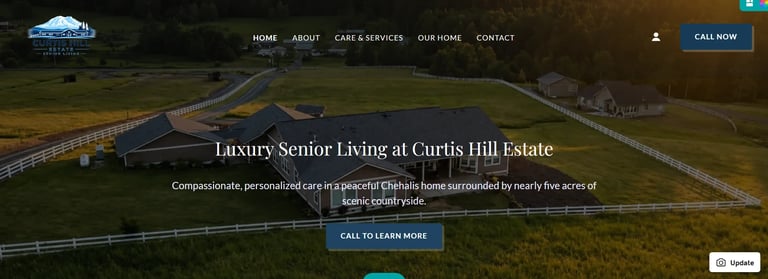
A small residential care home that needed to feel as warm and trustworthy online as it does in person — clear about the setting, the care, and the day-to-day, so families can understand the home before they ever reach out.
Visit Curtis Hill Estate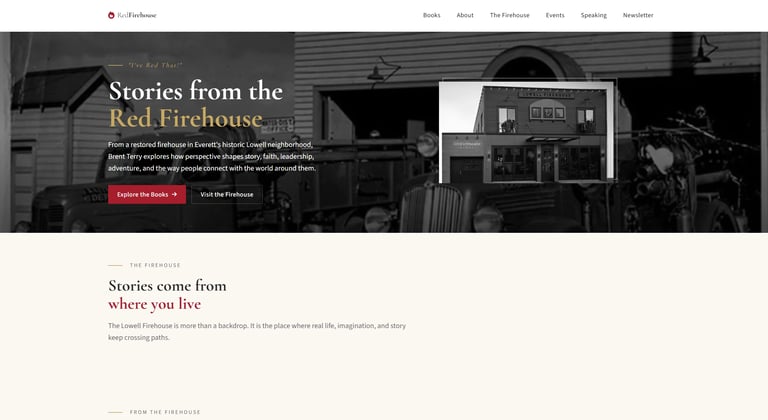
A website built around storytelling and brand personality rather than a traditional local-service template — content presented around the identity of the project instead of a generic small-business structure.
Visit Red Firehouse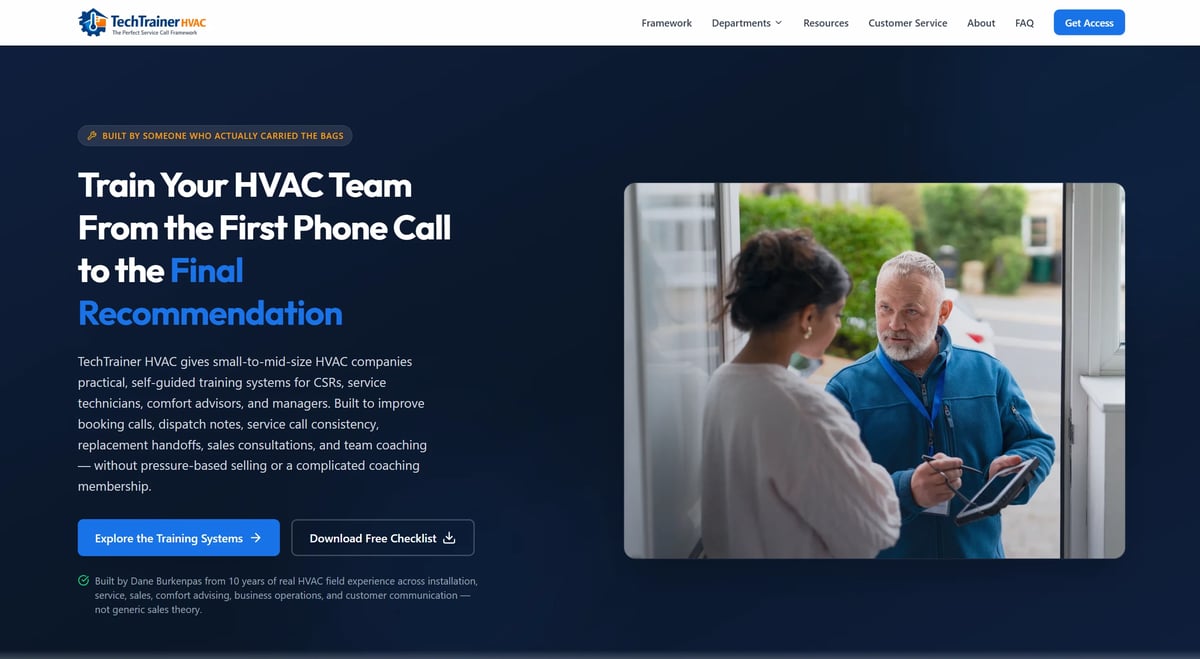
A more functional build focused on presenting HVAC training products clearly and giving customers a straightforward path from understanding the offer to purchasing it.
Visit TechTrainer HVACResidential Care Network started as a directory concept and became a provider-managed web platform built with accounts, dynamic listings, availability tools, verification workflows, administration controls, and recurring subscriptions.
See How I Built Residential Care NetworkNot every business needs the same type of website — different service levels are built for different situations, from a streamlined professional site to a fully custom Wix Studio build.
Streamlined Website
Starting at $599
A clean, professional online presence without extensive custom functionality — a well-structured, responsive site typically around 1–3 pages.
Streamlined is best when:
Professional Business Website
Starting at $999
For businesses that need a more customized website — custom or highly customized layouts, deeper strategy, content organization, SEO, and conversion-focused structure.
Professional is best when:
Custom Wix Studio Website
Starting at $1,799
The premium custom website service. Blank-canvas Wix Studio builds created specifically around the business — custom visual design, original layouts, responsive development, foundational SEO and accessibility considerations, quality checks, and ownership handoff.
Additional features like CMS collections, dynamic content, advanced forms, automations, integrations, and extensive content development or migration are included when specified in the agreed proposal. Final pricing depends on design complexity, content, functionality, and technical requirements.
Improvements, Management & Advanced Projects
Don't have to rebuild the whole site just because part of it needs work. I update, improve, consolidate, restructure, troubleshoot, and maintain existing websites — with optional ongoing support and management.
Larger websites, ecommerce, extensive CMS systems, advanced integrations, booking or membership functionality, and content migrations are quoted individually based on scope.
Not sure which level fits? Tell me about the business. I'll tell you what makes sense.
Designed by Dane develops a supporting digital visual system around a business's existing logo — so its website and future digital materials can feel cohesive and consistent, without redesigning the identity you already have.
What a Digital Brand System includes
What it does — and doesn't — include
Social media guidance explains how to apply the visual system across your digital presence — it does not include creating social media templates.
Original logo design, logo redesign, business cards, packaging, and a full collateral suite are outside the current service.
If you already have a logo and are unsure whether your website and digital materials feel consistent, reach out to discuss your situation.
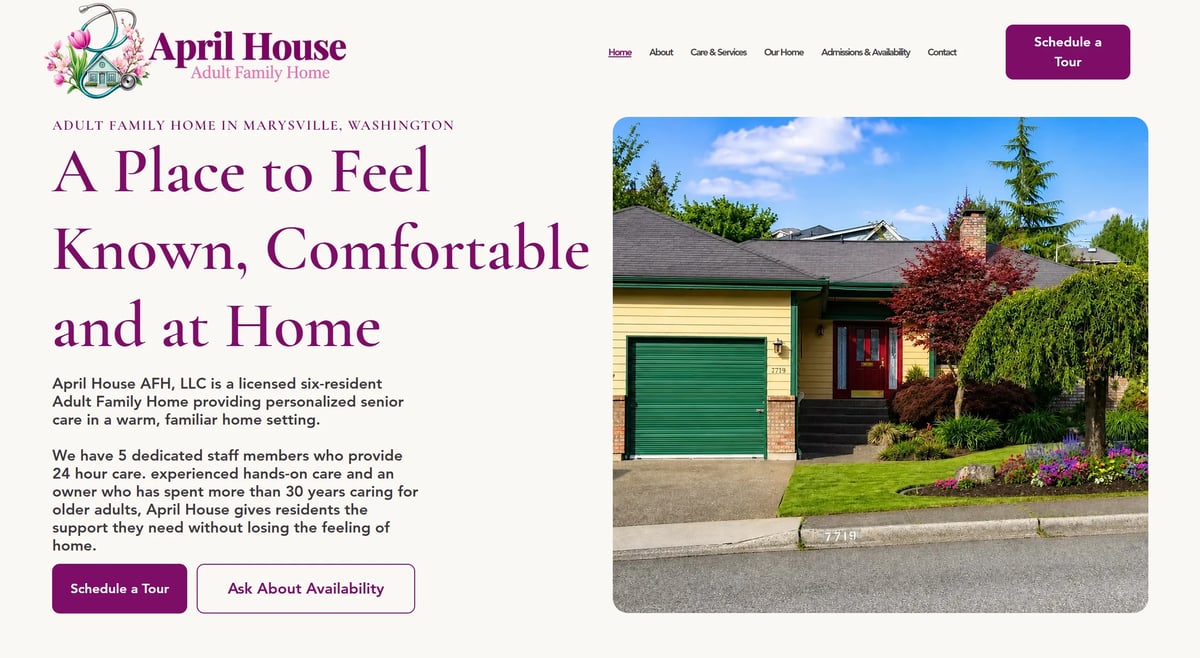
April House had an established logo. Designed by Dane developed the supporting visual system around it — building the color palette, typography, interface styling, accessibility rules, and visual guidance that made the brand usable and cohesive across the website.
April House brand guide
v1.0 · Sept 2026The client supplied the original logo; Designed by Dane documented the supporting system around it as these brand-guide specifications.
Colors
Typography
Headings
A Place to Feel Known
Cormorant Garamond · SemiBold
Body & Interface
Compassionate care in a warm, homelike setting — built around the people who live here.
Avenir Light
Avenir isn't available as a web font — shown here in a fallback sans-serif.
Buttons
Component samples — not functional inquiry buttons · 8 px corner radius · understated interaction.
The existing logo, kept and built around

The client's original logo — untouched — became the anchor for the entire digital visual system.
I review existing website content for outdated information, duplicate or overlapping pages, old promotions, weak content, unnecessary pages, and opportunities to improve or consolidate what is already there.
This can be completed as a one-time cleanup or incorporated into ongoing website management.
The goal is to keep the pages you already have accurate, useful, and easy for visitors — and search engines — to understand. Where it makes sense to consolidate or redirect, I'll recommend the cleanest path forward.
If your existing site has good bones, replacing the whole thing may be unnecessary. A lot of websites don't need to be thrown away — they need a clearer job.
Homepage restructuring
Clearer messaging
Service-page additions
Mobile improvements
Visual cleanup
Navigation changes
Stronger calls to action
Local and service page development
Internal linking
Search-foundation improvements
Content organization
I'll recommend a rebuild when a rebuild makes sense — not because it's the biggest project I can sell you.
The platforms are tools, not the product. I work across several supported website environments — including Squarespace, Wix, GoDaddy Website Builder, and Hostinger Website Builder — and choose based on what the project actually needs.
The goal is to choose the tool around the business — not force the business around the tool.
The decision can depend on:
Once the project is complete, the website remains yours. You can manage it yourself after launch, and Website Management is available separately if you'd rather keep me involved. Ongoing management is there when it's useful — not because the website is built to depend on me.
Note: normal third-party expenses like domain registration, hosting, or a website-platform subscription may still apply depending on the platform. Those don't disappear — but they aren't a fee I charge to keep your site running.
Manage It Yourself
Your website remains yours. You are not required to keep paying Designed By Dane just to keep the site.
Keep Me Involved
Optional Website Management is available if you'd rather have someone continue handling updates and improvements.
What you do, what you currently have, and what you're trying to accomplish.
Pages, structure, platform, functionality, and what actually needs to be built.
The site begins taking shape around the agreed direction.
You see the work and tell me what needs adjusting.
Make the appropriate changes within the agreed revision process.
Finalize and launch the finished website.
Most project communication happens digitally and email-first. That keeps decisions documented, scope clear, and details from getting lost along the way — so nothing important slips through the cracks.
The principles carry over. A clear structure, honest trust signals, and an obvious next step serve a roofing company as well as a care home.
Websites that help families understand the home, provider, care, environment, and next step.
Adult Family Home Website DesignAlso supported by real work
Search engines still need to understand what the business does, where it operates, and what each page is about. But that shouldn't require turning the website into a wall of keywords.
Build the site for the customer. Make the structure clear enough that Google can understand it too.
Website builds start at $599 for a Streamlined Website, $999 for a Professional Business Website, and $1,799 for a fully custom Wix Studio Website. Larger or more advanced projects are quoted individually based on scope. More complex functionality can affect pricing, and I'll tell you before anything changes. See the full pricing for detail.
There's no universal number. Page count should be driven by your services, the amount of information you need to share, your search needs, navigation clarity, customer questions, and functionality — not by trying to hit an arbitrary total. I'll recommend the smallest scope that does the job.
I work across several supported platforms including Squarespace, Wix, GoDaddy Website Builder, and Hostinger Website Builder. The platform is chosen based on the business and the project rather than forcing every client into one system.
Yes. Sometimes a full rebuild makes sense, and sometimes targeted improvements are enough. I'll recommend the approach that actually fits your situation — not automatically the bigger project.
Generally, yes — where the selected platform supports client editing. I'll set things up so you can manage your own site whenever the platform allows it.
No required Designed By Dane management subscription. Your website doesn't become a subscription because I built it. Normal platform, hosting, and domain costs may still apply depending on where the site lives, but Website Management with me remains optional.
Yes. Website Management is an optional separate service for businesses that want ongoing help with updates, edits, and improvements.
I help structure and refine the information you provide so it reads clearly and fits the site. If you're not sure what to say about parts of the business, I'll help you work through it — but I don't invent a separate copywriting package. The clearest content usually comes from your own knowledge of the business, organized properly.
Every build should have a sensible foundational search structure — clear topics, headings, metadata, and crawlable content. That foundation doesn't guarantee rankings. Larger, ongoing SEO and content work may be a separate scope depending on your situation.
Timing depends on scope, content, revisions, how quickly you can respond, and functionality. Rather than promise a universal timeline, I'll give you a realistic sense of pace once I understand the project.
The website is handed off and remains yours. You can manage it yourself, or keep me involved through optional Website Management. Normal platform, hosting, and domain costs may still apply.
You don't need to know the platform, number of pages, or exact scope yet.
Tell me about the business, what you currently have, and what you're trying to accomplish. I'll tell you what I think makes sense.